
Скачать SafeSpelling – AI проверка орфографии, грамматики и помощник по написанию
Обзор
В современном быстром цифровом мире качество письменной коммуникации может укрепить или разрушить профессиональную репутацию. SafeSpelling выступает в роли продвинутого AI‑помощника по написанию, который сосредотачивается на одной из самых распространённых проблем: орфографических ошибках. Работая на базе передовой языковой модели GPT‑4o, SafeSpelling не просто отмечает опечатки; он интеллектуально анализирует контекст каждого слова, предоставляя точные исправления в реальном времени. Независимо от того, пишете ли вы блог‑пост, дорабатываете бизнес‑отчёт или редактируете академическую статью, инструмент обещает бесшовный опыт, превращая черновики в отшлифованные, безошибочные документы.
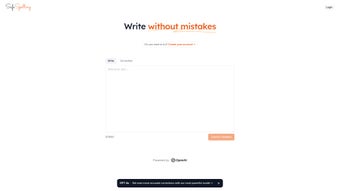
Пользовательский интерфейс преднамеренно минималистичен, позволяя писателям любого уровня сразу приступить к редактированию. После быстрой регистрации — требуется лишь адрес электронной почты и надёжный пароль — пользователи могут вставить или ввести свой текст в чистое окно редактора. Через секунды SafeSpelling подсвечивает орфографические ошибки, предлагает альтернативы и даже предлагает тонкие грамматические улучшения, повышающие читаемость без изменения голоса автора. Поскольку движок работает в облаке, обновления и улучшения модели доставляются автоматически, гарантируя, что пользователи всегда получают последние достижения AI без ручных патчей.
Хотя основное обещание — безупречная орфография, SafeSpelling расширяет свои возможности до более широкой оценки качества контента. AI оценивает структуру предложений, обнаруживает неуклюжие формулировки и предлагает улучшения связности, делая его лёгкой альтернативой полнофункциональным грамматическим пакетам. Однако сервис требует активного интернет‑соединения, так как вся обработка происходит на удалённых серверах; в настоящее время нет офлайн‑режима или отдельного мобильного приложения. Такой компромисс намерен, позволяя разработчикам использовать мощные GPU‑ресурсы и поддерживать строгие стандарты безопасности данных. В целом SafeSpelling предлагает убедительное сочетание скорости, точности и простоты использования для всех, кто хочет, чтобы их тексты были отшлифованы, профессиональны и свободны от неловких опечаток.
Core Features & Benefits
- Real‑time Spell Detection: Instantly highlights misspelled words as you type or paste text, reducing the need for manual proofreading.
- Context‑Aware Corrections: Uses GPT‑4o to understand surrounding words, delivering suggestions that fit the intended meaning.
- Grammar Enhancement: Beyond spelling, the AI flags basic grammatical errors and offers concise fixes.
- Coherence Optimization: Detects awkward phrasing and recommends smoother alternatives to improve flow.
- Secure Cloud Processing: All data is encrypted during transmission and never stored permanently, protecting user privacy.
- Auto‑Updates: Continuous model improvements are rolled out automatically, ensuring you always have the latest AI capabilities.
- User‑Friendly Dashboard: Simple, distraction‑free workspace that works on any modern browser.
- Multi‑Document Support: Handles plain text, rich text, and markdown formats without losing formatting.
The benefits of these features compound to create a tool that feels almost invisible yet profoundly impactful. Real‑time spell detection cuts down the average editing time by up to 40 %, while context‑aware suggestions mean fewer false positives—a common frustration with traditional spell‑checkers. The grammar and coherence modules, though lightweight compared to dedicated suites, still catch a surprising number of issues that would otherwise slip through a manual review.
Security‑focused cloud processing reassures enterprises that sensitive documents remain confidential, a crucial factor for legal and financial professionals. Moreover, because SafeSpelling lives entirely in the browser, there’s no cumbersome installation process, and the interface works identically on Windows, macOS, and Linux systems that support modern browsers. This universality makes SafeSpelling an ideal companion for remote teams, freelancers, and students alike, delivering a consistent experience regardless of the operating system or device.
How to Install and Use SafeSpelling
Installation of SafeSpelling is deliberately straightforward: there is no traditional “download and install” routine because the application runs as a web‑based service. To get started, navigate to the official SafeSpelling website using any up‑to‑date browser (Chrome, Edge, Firefox, Safari). Click the “Sign Up” button located at the top‑right corner. The registration form requests a valid email address, a strong password, and an optional referral code. After submitting the form, you’ll receive a verification email; click the embedded link to activate your account.
Once logged in, the main dashboard appears, featuring a large text box labeled “Paste or type your content here.” You can either copy‑paste existing documents or begin typing directly. As you input text, the AI engine processes each sentence in the background, highlighting misspelled words with a red underline. Hovering over an underlined word reveals a tooltip with the most likely correction; clicking the suggestion replaces the word instantly. For more complex issues—such as a grammar tip or a coherence suggestion—a blue underline appears, and a brief explanation is displayed when you click it.
SafeSpelling also offers batch processing for longer documents. After pasting a full article, you can press the “Analyze” button to run a comprehensive scan. The results appear in a side panel, categorised by “Spelling,” “Grammar,” and “Coherence.” Each entry includes a “Replace All” option for repetitive errors, saving you time on large files. Export options are provided at the bottom of the panel: you can download the corrected text as a .txt, .docx, or .md file, preserving original formatting where applicable.
Because the service is cloud‑based, you must maintain an internet connection throughout the editing session. If the connection drops, the application will display a gentle warning and pause analysis until the network is restored. All changes made locally are saved automatically in your browser’s local storage, so you won’t lose work if you need to refresh the page.
Finally, SafeSpelling includes a “Settings” gear icon where you can adjust language preferences (e.g., US English vs. UK English), enable or disable specific suggestion types, and manage your subscription plan. The intuitive layout ensures that even users with minimal technical expertise can harness the full power of AI‑driven spelling correction with just a few clicks.
Compatibility & System Requirements
SafeSpelling’s design philosophy embraces platform independence. Since the core engine runs on secure cloud servers, the only client‑side requirement is a modern web browser that supports HTML5, CSS3, and JavaScript ES6. The application has been tested extensively on the following operating systems:
- Windows 10, Windows 11 (any edition)
- macOS 12 Monterey, macOS 13 Ventura, and later versions
- Linux distributions with recent kernels (Ubuntu 20.04+, Fedora 33+, Debian 10+)
On mobile devices, the service can be accessed through mobile browsers (Chrome, Safari, Firefox) but a dedicated native app is not yet available. This means that while you can perform spell checks on tablets or smartphones, the experience may be less fluid than on a desktop due to smaller screen real estate. For optimal performance, we recommend a stable broadband connection with a minimum download speed of 5 Mbps; slower connections may increase the latency of real‑time suggestions.
Because all processing happens remotely, the client’s hardware specifications are modest. A minimum of 2 GB RAM and a dual‑core processor are sufficient to run the web interface smoothly. The service automatically detects your locale settings and can switch between US, UK, Canadian, and Australian English dictionaries, as well as support for Spanish and French spellings if you enable multilingual mode in the Settings panel. This broad compatibility ensures that SafeSpelling can be adopted by individuals and teams across diverse environments without the need for specialized IT support or additional software installations.
Pros & Cons
Pros
- Instant, AI‑driven spelling corrections with context awareness.
- Lightweight grammar and coherence suggestions that complement spell‑check.
- No installation required; works directly in the browser.
- Secure, encrypted data transmission and no permanent storage of user text.
- Automatic updates keep the AI model current without user intervention.
- Supports multiple English dialects and offers basic multilingual capability.
- Export options for various file formats preserve original document layout.
Cons
- Requires a constant internet connection; no offline mode.
- Limited to web browsers—no dedicated desktop or mobile applications yet.
- Grammar and style checks are basic compared to premium suites like Grammarly.
- Subscription‑based pricing may be a barrier for occasional users.
- Advanced customization (e.g., custom dictionaries) is not currently offered.
Frequently Asked Questions
Is SafeSpelling free to use?
SafeSpelling offers a limited free tier that allows up to 500 words per day. For unlimited usage, higher word counts, and premium features, a paid subscription is required.
Can SafeSpelling correct texts in languages other than English?
Yes, SafeSpelling includes basic spell‑check support for Spanish and French. Full grammar and coherence features are currently limited to English.
How does SafeSpelling protect my data?
All text is transmitted over HTTPS and encrypted in transit. The service does not store your documents permanently; they are processed in memory and discarded after the session ends.
Do I need a powerful computer to run SafeSpelling?
No, because the heavy AI processing occurs on cloud servers. A modern browser on a modest computer (2 GB RAM, dual‑core CPU) is sufficient.
Can I integrate SafeSpelling with other tools like Google Docs?
Currently SafeSpelling works as a standalone web app. However, you can copy‑paste content between Google Docs and SafeSpelling for quick checks.
Conclusion & Call to Action
In a landscape crowded with generic spell‑check tools, SafeSpelling distinguishes itself by harnessing the power of GPT‑4o to deliver context‑aware corrections that feel both intelligent and unobtrusive. Its browser‑based architecture eliminates the friction of downloads and updates, while robust security measures keep your writing private. Although the lack of offline capability and a dedicated mobile app may limit some use‑cases, the trade‑off is a consistently high‑quality AI engine that improves with every iteration.
If you’re a writer, editor, student, or professional who values clean, error‑free prose, SafeSpelling offers a compelling solution that can shave minutes off your editing workflow and boost confidence in your final drafts. Take advantage of the free tier to test the service, then consider upgrading for unlimited access and premium support. Click the button below to create your account and start correcting your text instantly—because every great idea deserves flawless spelling.



.png)



